Content
Confidential Containers (Coco)
What are confidential containers (CoCo)?
Confidential Containers (CoCo) is an open-source project of the Cloud Native Computing Foundation (CNCF), now at incubating status. It runs each Kubernetes pod inside its own lightweight confidential virtual machine, backed by hardware TEEs such as Intel TDX or AMD SEV-SNP. The memory inside that VM is encrypted by the processor. The host operating system, the hypervisor, the cloud provider, and cluster administrators can't read it.
You still write a normal pod spec. You select a CoCo runtime class, and the platform does the rest.
What problem does CoCo solve that normal containers and Kubernetes don't?
Standard Kubernetes protects data at rest and in transit. Once a workload is running, though, its data and model weights sit unencrypted in memory, and anyone with enough privilege on the node can get to them: a node admin, a compromised hypervisor, a cloud operator.
CoCo closes that gap. Data stays protected while it's in use, and the trust model no longer depends on whoever runs the infrastructure. For regulated data and proprietary AI models, that's often the difference between a pilot and a production rollout.
How is CoCo different from just using confidential VMs?
A confidential VM protects the whole machine, usually a full Kubernetes node. Everything on that node shares one trust boundary, and the node itself is still managed by people you may not want to trust.
CoCo moves the boundary down to the pod. Each pod gets its own confidential VM, its own attestation, and its own keys. That fits how teams actually ship AI: as many small, independently deployed workloads. You keep Kubernetes scheduling, scaling and tooling, and you don't have to hand out access to entire nodes.
Which hardware is supported in confidential containers (CoCo)?
The CoCo project supports confidential CPUs from Intel (TDX) and AMD (SEV-SNP), plus IBM Secure Execution on IBM Z and LinuxONE. For accelerated AI, NVIDIA's Confidential Containers (CoCo) reference architecture, generally available since April 2026 and deployed through the NVIDIA GPU Operator, adds confidential NVIDIA GPUs on Intel TDX or AMD SEV-SNP hosts: Hopper (H100, H200), Blackwell (B200, HGX B300) and RTX PRO 6000 Blackwell Server Edition.
Fortanix Confidential AI supports Intel TDX, AMD SEV-SNP, and NVIDIA Hopper and Blackwell GPUs. See question 17 for detail.
How do secrets and encryption keys get into the pod?
They are never baked into the image or handed over by the host. The confidential VM pulls the container image itself and, if the image is encrypted, decrypts it inside the TEE. When the workload needs a key or secret, components inside the guest (the attestation agent and the Confidential Data Hub) collect hardware evidence about the CPU, the GPU and the software that was loaded, and present it to an attestation service. Only if that evidence matches policy is the secret released, and only into the TEE.
The same flow unlocks encrypted container images, sealed Kubernetes secrets, and model weights or datasets. With Fortanix, the attestation agent attests to Fortanix Confidential Computing Manager (CCM), which returns a short-lived workload certificate. The pod then uses that certificate to request keys from Fortanix Data Security Manager (DSM), a FIPS-certified HSM, over mutually authenticated TLS.
What are peer pods, and when do you need them in CoCo?
Peer pods (the CoCo cloud-api-adaptor) launch each confidential container as a separate confidential VM through the cloud provider's API, instead of starting it on the worker node itself.
You need them mainly when your worker nodes are themselves cloud VMs, because most clouds and TEEs can't run a confidential VM nested inside another VM with good performance. Peer pods also work with on-premises libvirt and IBM Z. On bare-metal servers with TEE support, CoCo starts the confidential VM directly on the node, so peer pods aren't required.
To run an existing application in CoCo, are any code changes required?
Usually not. CoCo is designed to run existing container images with minimal modification. Most of the change is deployment configuration: a CoCo runtime class in the pod spec, an agent policy, and the address of the attestation and key service, typically passed in through init-data.
A few things to plan for. The confidential VM pulls images itself, so it needs to reach your registry. Applications that read secrets from Kubernetes Secrets or environment variables should get them through attested release instead, as sealed secrets or from the Confidential Data Hub inside the pod. Some operations, such as exec, log streaming and certain volume types, may also be restricted by policy.
How do you debug or get logs from a confidential container?
Debugging works differently by design. Because the host isn't trusted, the CoCo agent policy decides whether the host may run kubectl exec or stream container logs. Production policies typically deny both.
Teams usually handle this two ways:
- Use a more permissive debug policy in development and test clusters, where the data isn't sensitive.
- In production, have the workload send its own logs and metrics from inside the TEE to a log destination you trust, over an encrypted connection.
Fortanix also records every attestation, certificate issuance and key release centrally, so you can see why a pod did or didn't receive its keys without opening the pod.
How does Fortanix Confidential AI relate to CNCF Confidential Containers (CoCo)?
CoCo protects the workload. It assumes a separate trusted service will check each workload before any sensitive data or keys reach it. The project's open-source reference for that role is Trustee, which teams deploy, secure and run in a trusted environment of their own.
Fortanix Confidential AI delivers that trusted layer as one enterprise platform. Fortanix CCM handles attestation, and Fortanix DSM handles secure key release from a FIPS-certified HSM. Fortanix connects through the CoCo guest components that already run inside every confidential container, so CoCo still runs your pods, and Fortanix decides, with cryptographic proof, which of those pods get keys.
What does "the host can't be trusted" mean in practice inside CoCo?
It means the security model assumes that everything outside the confidential VM could be hostile. That includes the node's operating system, the hypervisor, the Kubernetes control plane's view of the node, cloud provider staff, and your own cluster administrators.
In practice:
- The host can schedule, start and stop the pod, but it can't read the pod's memory.
- Secrets go only to code that has proved, through hardware attestation, what it is and where it runs.
- Policy limits which requests the host can make to the guest, so admin access isn't a back door into the workload.
That's also why the attestation and key service has to sit outside the cluster's admin domain. If the people who run the cluster also control key release, the model breaks.
What stays trusted is small and explicit: the CPU and GPU hardware and firmware, the guest image, and the attestation and key service. The host can still stop a pod or refuse to run it. CoCo protects confidentiality and integrity, not availability.
Why do containers and confidential computing no longer have to be a trade-off between speed and security?
Earlier confidential computing often meant rewriting applications for enclaves, or standing up separate infrastructure outside your normal pipeline. Teams had to choose: move fast on Kubernetes, or protect data in use.
CoCo removes most of that cost. Workloads stay as standard containers, deployed with the same pipelines and Kubernetes tooling. The part that remained hard was the trust layer, meaning attestation, key custody, policy and audit, at production quality. Fortanix provides that layer as a platform, so platform teams add confidential computing as a deployment option rather than a separate project. That's what we mean by Confidential AI on Kubernetes, at container speed.
How does Fortanix verify a container before releasing keys?
Every request for a key starts with proof. The sequence:
- The confidential container starts and gathers hardware evidence for its CPU TEE (Intel TDX or AMD SEV-SNP) and, where used, its NVIDIA GPU.
- Fortanix CCM verifies each piece of evidence with its matching service: Intel DCAP for Intel TDX, AMD KDS for AMD SEV-SNP (or Azure Attestation on Azure), and the NVIDIA Remote Attestation Service (NRAS) for GPUs. It combines the CPU and GPU results into one decision (composite attestation), checks the measured software against your policy, and issues the pod a short-lived workload certificate.
- The pod presents that certificate to Fortanix DSM over mutually authenticated TLS. DSM releases the requested key from its FIPS-certified HSM only to a certificate issued by your CCM, and only into the pod's protected memory.
- If any check fails, CCM issues no certificate and DSM releases no key. No attestation, no keys, no access.
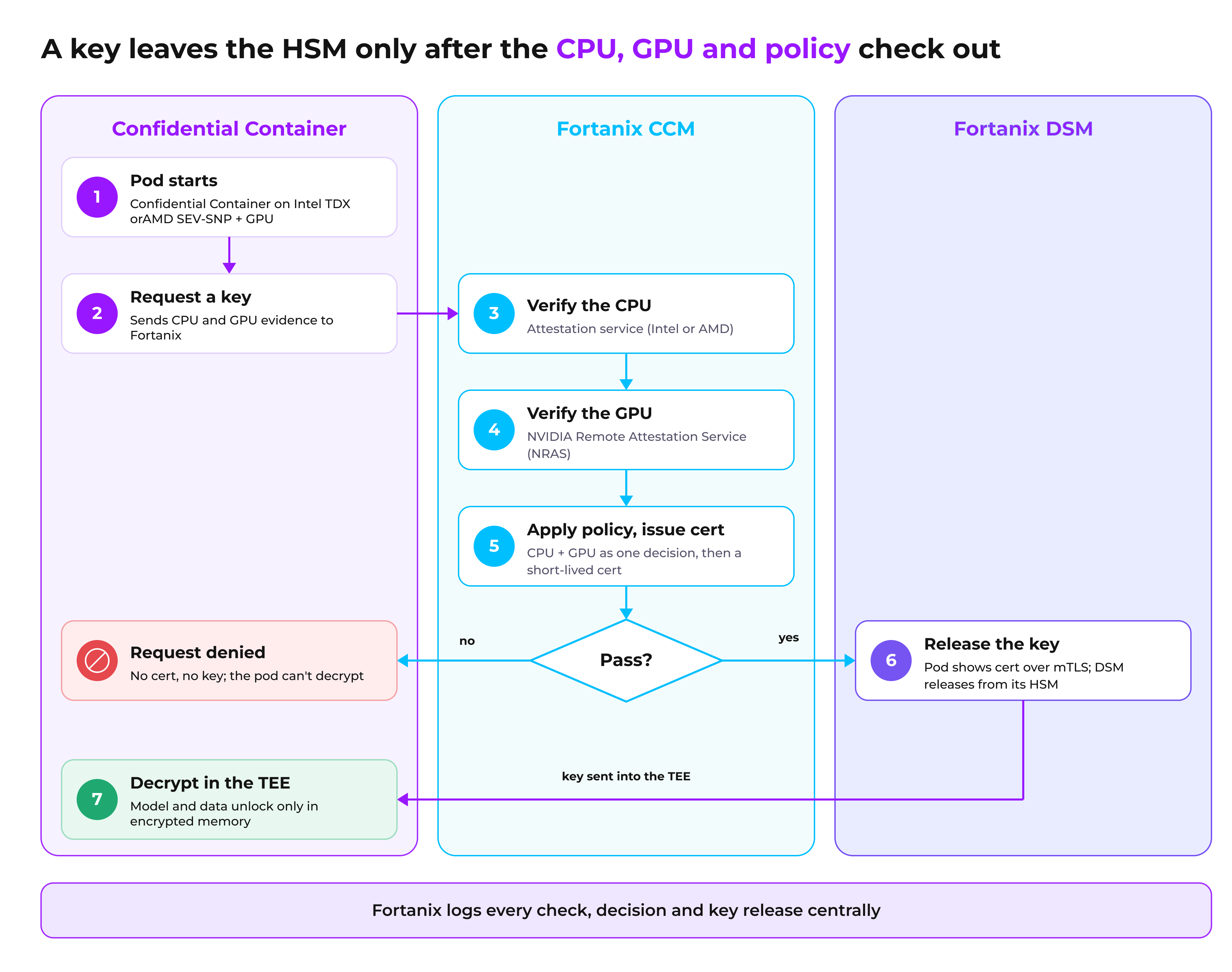
attestation-gated key release · 7 steps across pod, CCM and DSM
Each step is logged for audit (question 14).
How are attestation policies defined and enforced in a confidential container (CoCo)?
Two kinds of policy work together:
- Guest policy. Set in the pod's deployment configuration (usually through init-data), it limits what the host is allowed to ask the confidential VM to do (for example, whether exec or log streaming is allowed). It's enforced inside the TEE.
- Attestation and key release policy. It defines what a trustworthy workload looks like: approved hardware and firmware, expected measurements and image digests, and for AI workloads the required GPU state. It also says which keys each verified workload may receive.
With Fortanix, attestation policy lives in Fortanix CCM, which can also check conditions such as region, tenant and workload identity before it issues a certificate. Key access policy lives in Fortanix DSM, which decides which keys each attested workload may use. Both are managed centrally and enforced on every request, with one policy model across containers, confidential VMs and enclaves, on-premises, sovereign and public cloud.
How is every attestation and key release audited in CoCo?
Fortanix records every attestation decision, certificate issuance and key release in a central, tamper-evident audit log with cryptographic timestamps: which workload asked, what evidence it presented, which policy applied, the result, and which key was released. Security and compliance teams get one place to prove what ran, where it ran, and who received which keys, without depending on logs from inside individual clusters.
Do you need to rewrite your applications to use Fortanix with CoCo?
No application rewrite is needed. Fortanix plugs into the CoCo guest components (the attestation agent and the Confidential Data Hub) that already run inside each confidential container, so your application code and container images stay the same. The work is configuration: running a CoCo guest image with the Fortanix integration enabled, pointing it at Fortanix CCM and DSM, defining policy, and bringing your workloads' keys under Fortanix DSM.
Does it work with standard CoCo workflows and Kubernetes tooling?
Yes. You deploy with the same pod specs, Helm charts and CI/CD pipelines you use today, with CoCo runtime classes on the pods that need protection. Fortanix changes only the step where a pod proves itself and fetches its keys, so developers and platform teams don't learn a new deployment model.
Which confidential CPUs and GPUs are supported?
| Type | Technology |
Supported with Fortanix Confidential AI |
|---|---|---|
| Confidential CPU | Intel TDX | Yes |
| Confidential CPU | AMD SEV-SNP | Yes |
| Confidential GPU | NVIDIA Hopper | Yes |
| Confidential GPU | NVIDIA Blackwell | Yes |
For GPU workloads, Fortanix attests the CPU and GPU together before releasing keys, so a model never decrypts on a GPU that hasn't been verified. In confidential containers (CoCo), the GPU must be one that NVIDIA's CoCo stack supports in confidential computing mode (see question 4). Fortanix CCM also supports Intel SGX and AWS Nitro Enclaves, so one policy and key platform covers containers, confidential VMs and enclaves.
What is the performance impact of attestation and key release on workload startup?
Most of the cost comes at startup. A confidential container boots its own small confidential VM, pulls its image inside that VM, and completes attestation before it can decrypt data or model weights. With Fortanix, attestation produces a short-lived workload certificate that the pod reuses until it expires, so attestation isn't repeated for every key request.
Runtime overhead depends on the workload, the model size and the hardware. Large, compute-bound models tend to see less impact than small models or workloads that move a lot of data between CPU and GPU. We recommend measuring it in a proof of concept with your own models. Placing Fortanix close to your clusters, or running it on-premises, keeps the key release round trip short.
How does CoCo protect data privacy and AI intellectual property, such as proprietary models?
Model weights and sensitive data stay encrypted until they are inside a verified TEE, and they're decrypted only in hardware-encrypted memory that the host can't read. That protects against a rogue administrator, a compromised hypervisor, or a cloud operator copying the model or the data while it's in use.
This matters on both sides of a deployment. Enterprises can run third-party or frontier models on regulated data without exposing that data. Model providers can deploy their weights into a customer's cluster or a shared GPU cloud without handing over their IP. In both cases, Fortanix holds the keys and releases them only to attested workloads.
Can CoCo support frontier AI and large-model workloads?
Yes. NVIDIA's Confidential Containers (CoCo) reference architecture, generally available since April 2026, supports Hopper (H100, H200) and Blackwell (B200, HGX B300) GPUs, including multi-GPU passthrough on HGX systems, so large models can run for inference and fine-tuning inside TEEs. The CoCo community lists accelerated inference and fine-tuning, retrieval-augmented generation (RAG) and federated learning as confidential AI use cases. Fortanix adds composite CPU and GPU attestation, HSM-backed custody of model and data keys, and central audit across every cluster running the model.
How do you get started with CoCo or run a proof of concept?
Most teams start with one workload that's blocked today because of data sensitivity or model IP, often an inference service or a RAG pipeline. A typical proof of concept runs in four steps:
- Pick the workload and the cluster: bare-metal nodes with Intel TDX or AMD SEV-SNP, or cloud instances using peer pods, plus confidential GPUs if the model needs them.
- Install CoCo on the cluster and deploy the workload with a CoCo runtime class.
- Connect the pod to Fortanix Confidential AI, define the attestation and key release policy, and move the workload's keys into Fortanix DSM.
- Show the result: the pod receives keys only after it passes attestation, a tampered or unverified pod gets nothing, and every decision appears in the audit log.
To scope a proof of concept with our team, contact Fortanix at fortanix.com.
What are the prerequisites for adopting an existing CoCo setup?
If you already run CoCo, adding Fortanix is mostly configuration. Have these in place:
- TEE-capable infrastructure. Nodes or cloud instances with Intel TDX or AMD SEV-SNP, and NVIDIA Hopper or Blackwell GPUs in confidential computing mode for GPU workloads.
- A working CoCo deployment. CoCo runtime classes installed, peer pods configured if you run on cloud VMs, and a guest image with the Fortanix integration enabled.
- Known-good references. The container image digests and measurements your policy will treat as trusted.
- Network access. Confidential containers can reach Fortanix CCM and DSM over outbound HTTPS (port 443), whether that's SaaS, on-premises or air-gapped.
- Your keys. The data and model keys your workloads need, ready to bring under Fortanix DSM.