Securing Kubernetes Secrets with Fortanix DSM

The Kubernetes Secrets Problem
If you've worked with Kubernetes for any length of time, you've probably had that uncomfortable moment: realizing that your "secrets" are just base64 encoded strings sitting in etcd. Run a quick kubectl get secret my-secret -o yaml, and there it is, your database password, one decode away from exposure.
This isn't a flaw in Kubernetes design; it's a trade-off for simplicity. But for organizations handling sensitive data financial transactions, healthcare records, or customer PII this trade-off is unacceptable.
Enter Fortanix Data Security Manager (DSM): a cloud native key management solution backed by hardware security modules (HSMs). Fortanix DSM offers three distinct methods for securing secrets in Kubernetes environments, each designed for different operational models and security requirements.
In this post, we'll explore all three approaches, understand how they work under the hood, and help you determine which one or which combination fits your organization.
The Three Paths to Kubernetes Secrets Security
Fortanix DSM provides three primary integration methods for Kubernetes:
- External Secrets Operator (ESO) Integration: Sync secrets from DSM to native Kubernetes Secrets
- Secret Store CSI Driver: Mount secrets directly into pods via the Container Storage Interface
- Secrets Injection Admission Controller: Inject secrets at runtime without ever storing them in etcd
Additionally, there's the KMS Plugin for encrypting all etcd data at rest, which can be combined with any of the above methods for defense-in-depth.
Method 1: External Secrets Operator (ESO)
How It Works
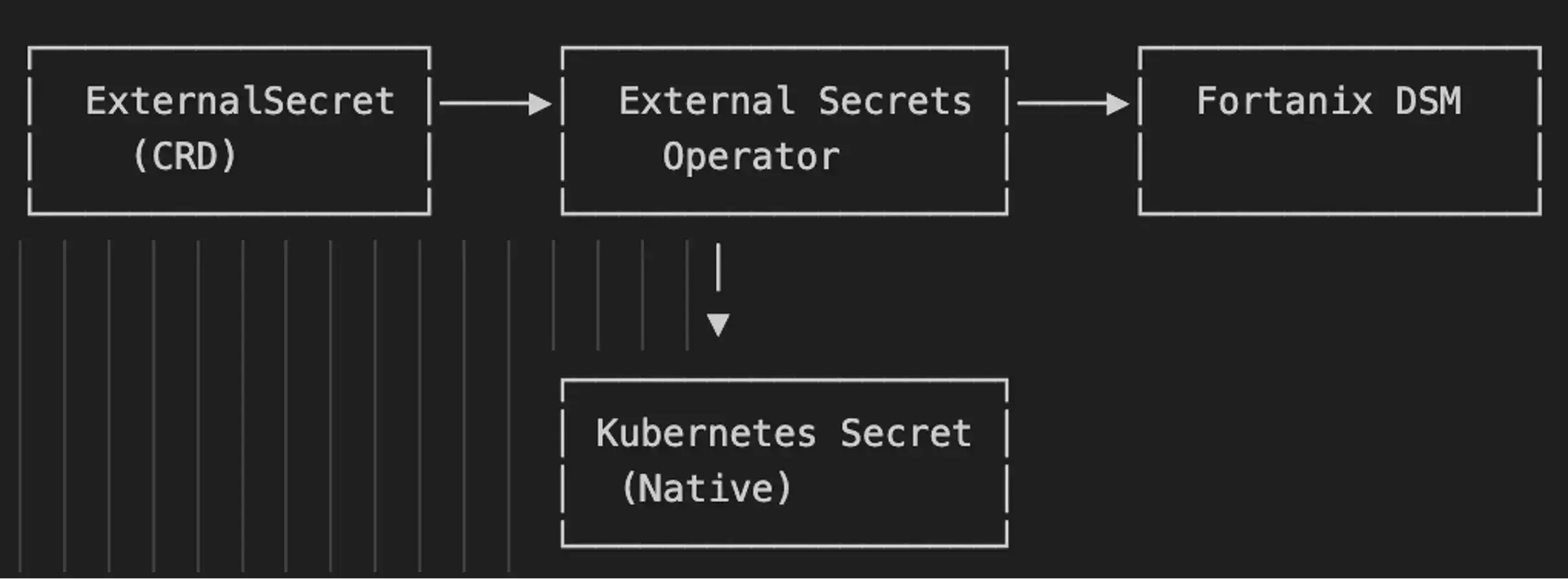
The External Secrets Operator is a Kubernetes native solution that's become the de facto standard for external secret management. ESO acts as a bridge between your cluster and external secret stores including Fortanix DSM.
You define two resources:
- SecretStore: Configures the connection to Fortanix DSM (endpoint URL, API key reference)
- ExternalSecret: Specifies which secrets to fetch and how often to sync them
The operator periodically polls DSM based on your configured refresh interval, fetches the secrets, and creates or updates native Kubernetes Secret objects.
Security Posture
Secrets are centrally managed in Fortanix DSM with full audit trails, access controls, and HSM backed protection. However, synchronized copies exist in etcd as native Kubernetes Secrets. For environments where secrets persistence in etcd is acceptable (especially when combined with the KMS Plugin for etcd encryption), ESO provides a solid security foundation with minimal operational complexity.
For detailed setup instructions, refer to the Fortanix DSM with External Secrets Operator documentation.
Method 2: Secret Store CSI Driver
How It Works
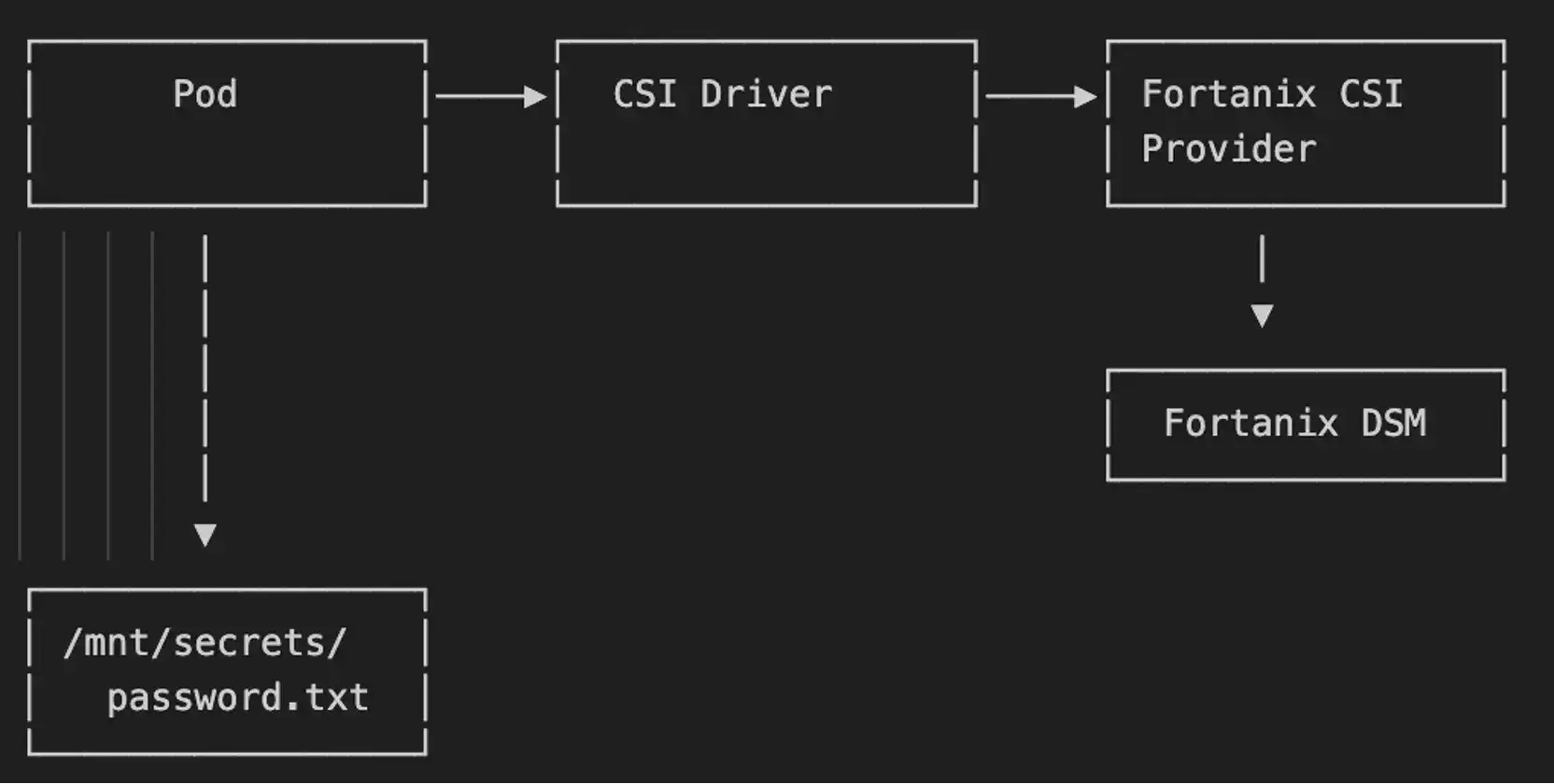
The Container Storage Interface (CSI) is how Kubernetes handles storage plugins. The Secrets Store CSI Driver extends this concept to secrets: instead of mounting a disk, you mount secrets as files in your pod's filesystem.
The Fortanix CSI Provider is a plugin that teaches the CSI Driver how to talk to Fortanix DSM. When a pod starts, the CSI Driver intercepts the volume mount request, calls the Fortanix provider, which authenticates to DSM and retrieves the secrets. These are then mounted as files at your specified path. The driver also supports automatic secret rotation periodically checking for updated secrets and refreshing mounted files without requiring pod restarts.
Security Posture
Secrets are fetched at runtime and mounted ephemerally, they don't have to exist in etcd as Kubernetes Secret objects. This reduces the attack surface by ensuring secrets exist only on nodes where they're actively needed. The CSI Driver also supports optional synchronization to Kubernetes Secrets for applications that require it, giving you flexibility to balance security with compatibility.
For detailed setup instructions, refer to the Fortanix DSM with Secret Store CSI Driver documentation.
Method 3: Secrets Injection Admission Controller
How It Works
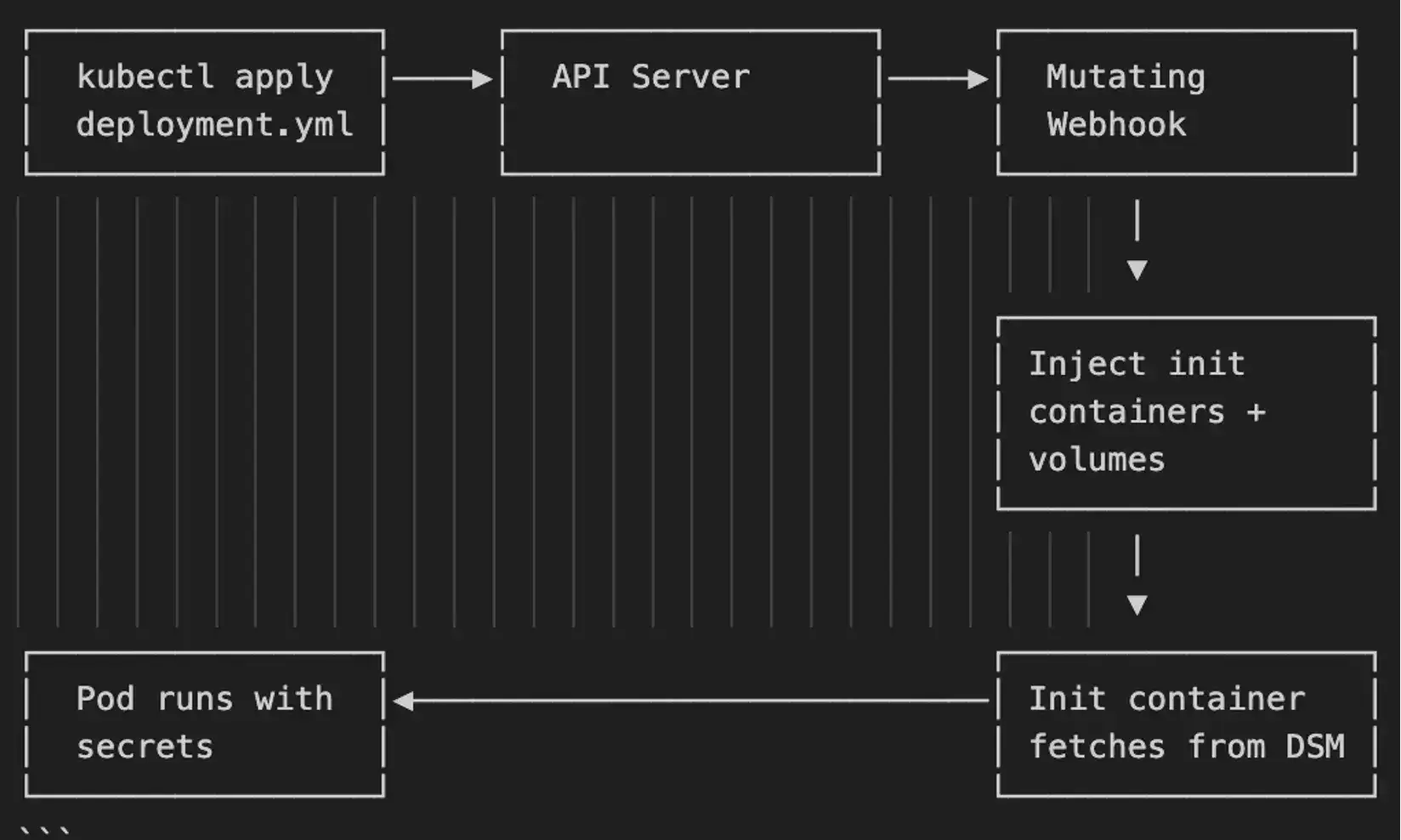
This is the most sophisticated approach. It leverages Kubernetes Admission Controllers to intercept pod creation requests and mutate them on the fly.
When you deploy an application, the Fortanix admission controller:
- Intercepts the pod creation request
- Reads annotations on the pod spec
- Injects init containers that authenticate to Fortanix DSM
- Pulls secrets and makes them available as environment variables or files
- Allows the pod to proceed with secrets already in place
The critical difference: secrets never touch etcd. They flow directly from Fortanix DSM into the running pod at startup time.
JWT Authentication: Solving "Secret Zero"
Here's where the admission controller really shines. Traditional approaches require storing an API key somewhere, but where do you store the secret that protects your secrets? This is the "Secret Zero" problem.
Fortanix supports Kubernetes Service Account Token Volume Projection. Instead of API keys, pods authenticate using signed JWTs generated by the Kubernetes API server itself. These tokens are:
- Automatically rotated
- Scoped to specific audiences
- Time limited with configurable TTL
- Signed by the API server's private key
Fortanix DSM verifies these tokens using the cluster's public key, then grants access based on the service account identity. No API keys to manage, no secrets to bootstrap.
Security Posture
Secrets exist only in volatile memory within running pods they never persist in etcd, on disk, or in any intermediate storage. Combined with JWT authentication, there are no persistent credentials anywhere in the cluster. Every secret access is logged with cryptographic attestation of the requesting workload's identity, providing complete audit trails for compliance. This approach meets the most stringent requirements including FIPS 140-2, FedRAMP, HIPAA, and PCI DSS.
For detailed setup instructions, refer to the Fortanix DSM Secrets Injection in Kubernetes documentation.
*Related read: Kubernetes Secrets Injection with Fortanix DSM
KMS Plugin for etcd Encryption
While not a secrets injection method per se, the Fortanix KMS Plugin deserves mention. It encrypts all data in etcd including Kubernetes Secrets using a master key stored in Fortanix DSM.
This is envelope encryption: Kubernetes generates data encryption keys (DEKs), which are then encrypted by the key encryption key (KEK) in DSM. The actual encryption keys never leave the HSM.
Use the KMS Plugin when:
- You need encryption at rest for compliance
- You want defense-in-depth alongside other methods
- You're running enterprise Kubernetes where etcd protection is mandatory
Choosing Your Approach
| Requirement | Recommended Method |
|---|---|
| Secrets can exist in etcd (encrypted) | ESO + KMS Plugin |
| Secrets should not persist in etcd | CSI Driver or Admission Controller |
| No API keys anywhere in cluster | Admission Controller with JWT |
| HSM backed key management | Any method (DSM provides this natively) |
| Audit trail for all secret access | Any method (DSM provides this natively) |
Conclusion
Kubernetes secrets management doesn't have to be a security liability. Fortanix DSM provides three robust paths to protecting sensitive data, each optimized for different operational models:
- ESO for teams wanting Kubernetes native workflows with minimal friction
- CSI Driver for runtime only secrets with automatic rotation
- Admission Controller for zero trust environments where secrets never touch etcd
The right choice depends on your security requirements, compliance obligations, and operational preferences. For many organizations, the answer isn't a single method but a combination: ESO for convenience in development, Admission Controller for production, and KMS Plugin across the board.
What matters most is that you're moving beyond base64 encoding and toward a proper secrets management solution. Your security team and your auditors will thank you.